Kana Shield
Security for your WordPress site, installed and configured for you.
Kana Shield is a security plugin for WordPress that blocks hacking attempts, stops password guessing, spam bots and bad AI agents, and shows you exactly what it stopped. KanaStudio installs and configures it on your site; a yearly license keeps it protected and updated.
- Installed and configured by KanaStudio
- No database writes on normal page views
- Every feature switchable, every message editable
Bots probe every WordPress site, every day.
Password guessing
Bots try thousands of passwords on your login page.
- Lockouts per IP and per username
- Optional two-factor login with backup codes
- Optional hidden login address
Attack scans
Scanners hunt for SQL injection, XSS and leaked files.
- Firewall blocks attack patterns before WordPress runs
- .env, .git, backups and logs blocked
- Usernames hidden from scans and the REST API
Spam, floods and AI bots
Automated traffic that wastes resources and fills your inbox.
- Honeypots catch comment and login spam bots
- Scanner floods banned automatically
- AI training scrapers: allow, ask or block
Not knowing
Most site owners never see any of it happen.
- Dashboard of everything that was stopped
- Weekly security report by email
- Alerts for lockouts, new admins and changed files
Everything in one plugin
Request firewall
Login lockouts
Two-factor login
Bot and AI control
Username protection
Security headers
File integrity checks
Activity log and reports
See it in action
See everything it stopped
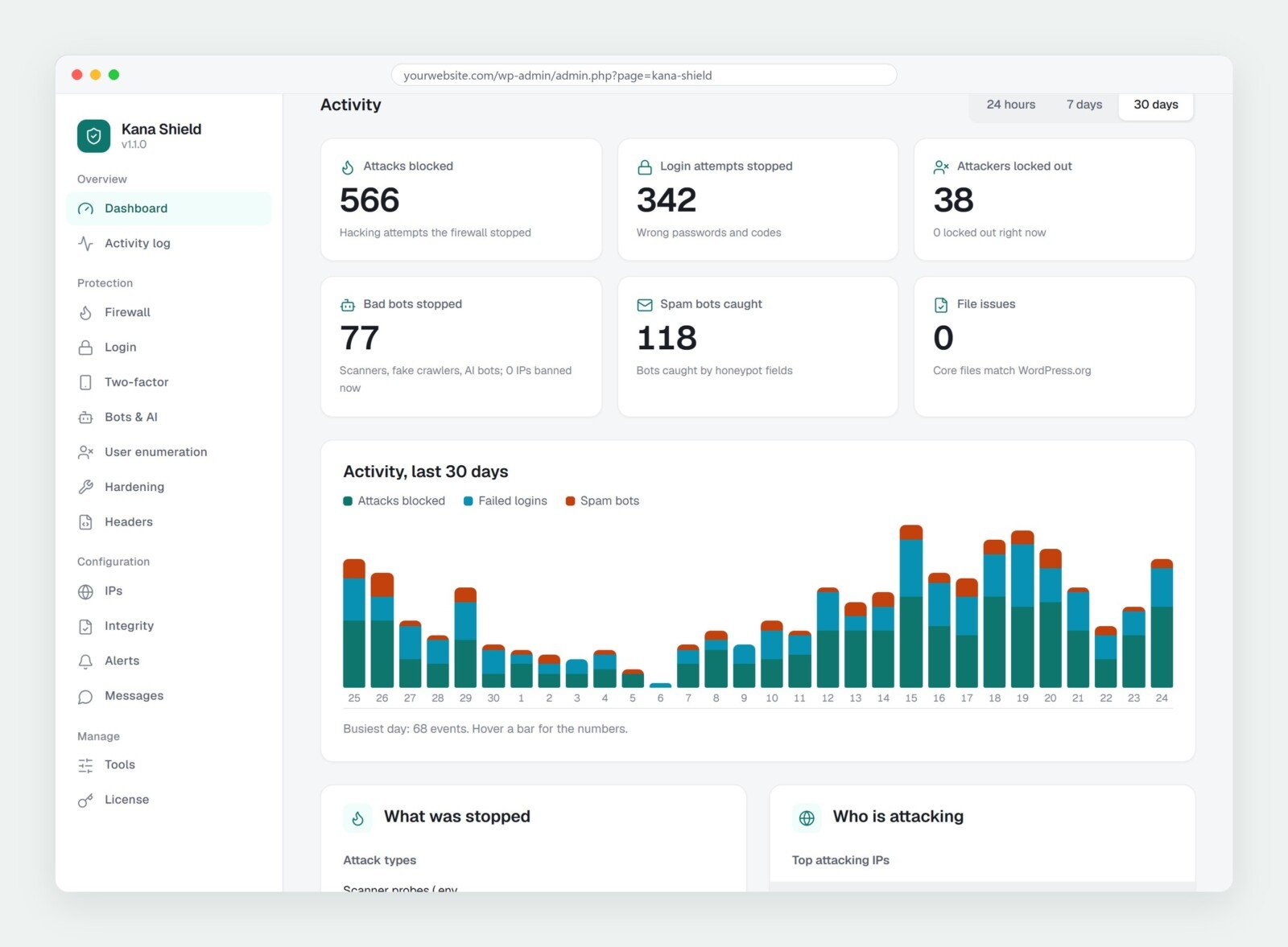
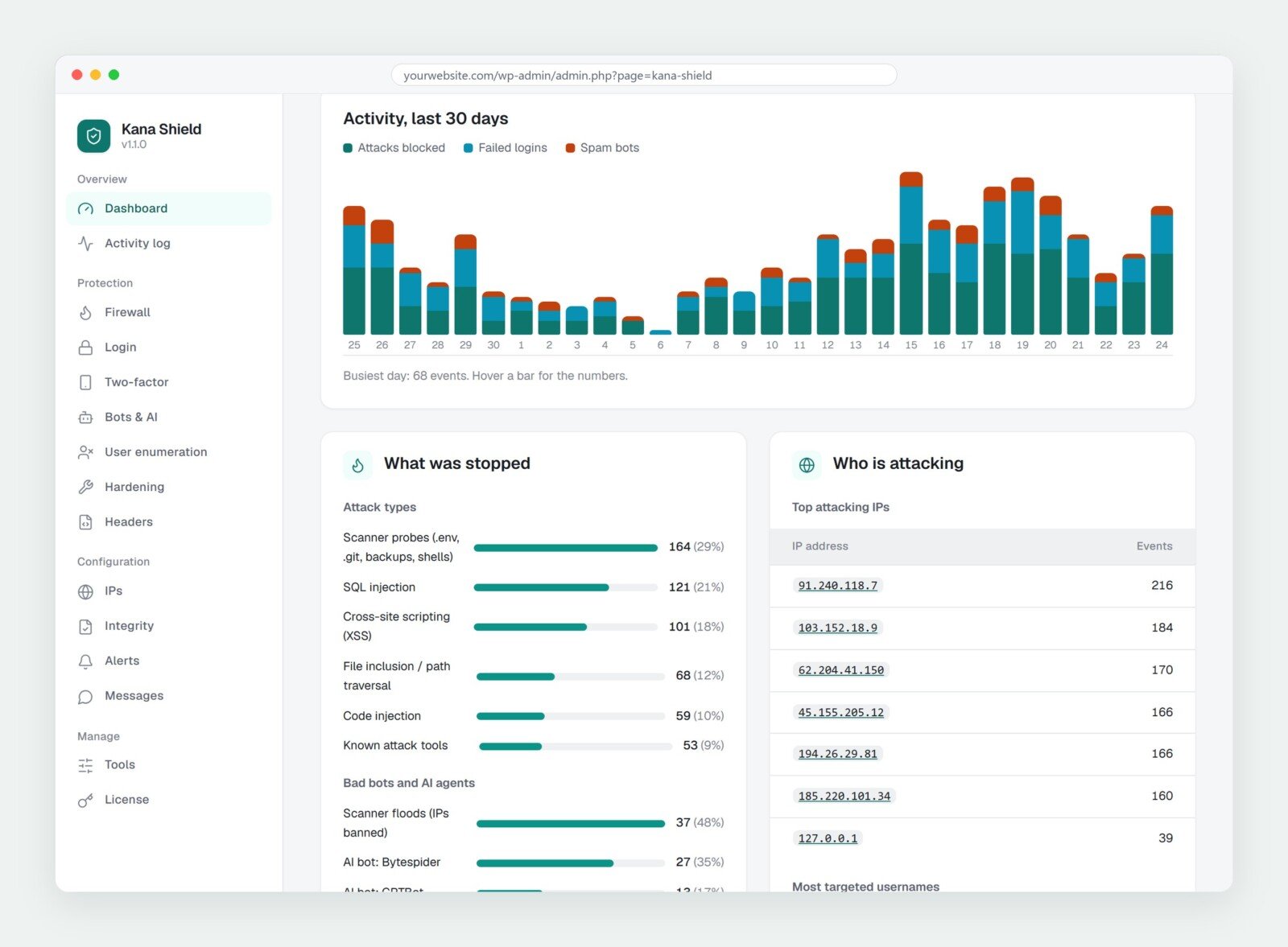
The dashboard counts attacks blocked, login attempts stopped, attackers locked out, bad bots and spam caught, with a daily chart for the last 24 hours, 7 days or 30 days.
- Totals since install, so you know it is working
- One-line status: protected, or what needs attention
Attacks blocked before WordPress runs
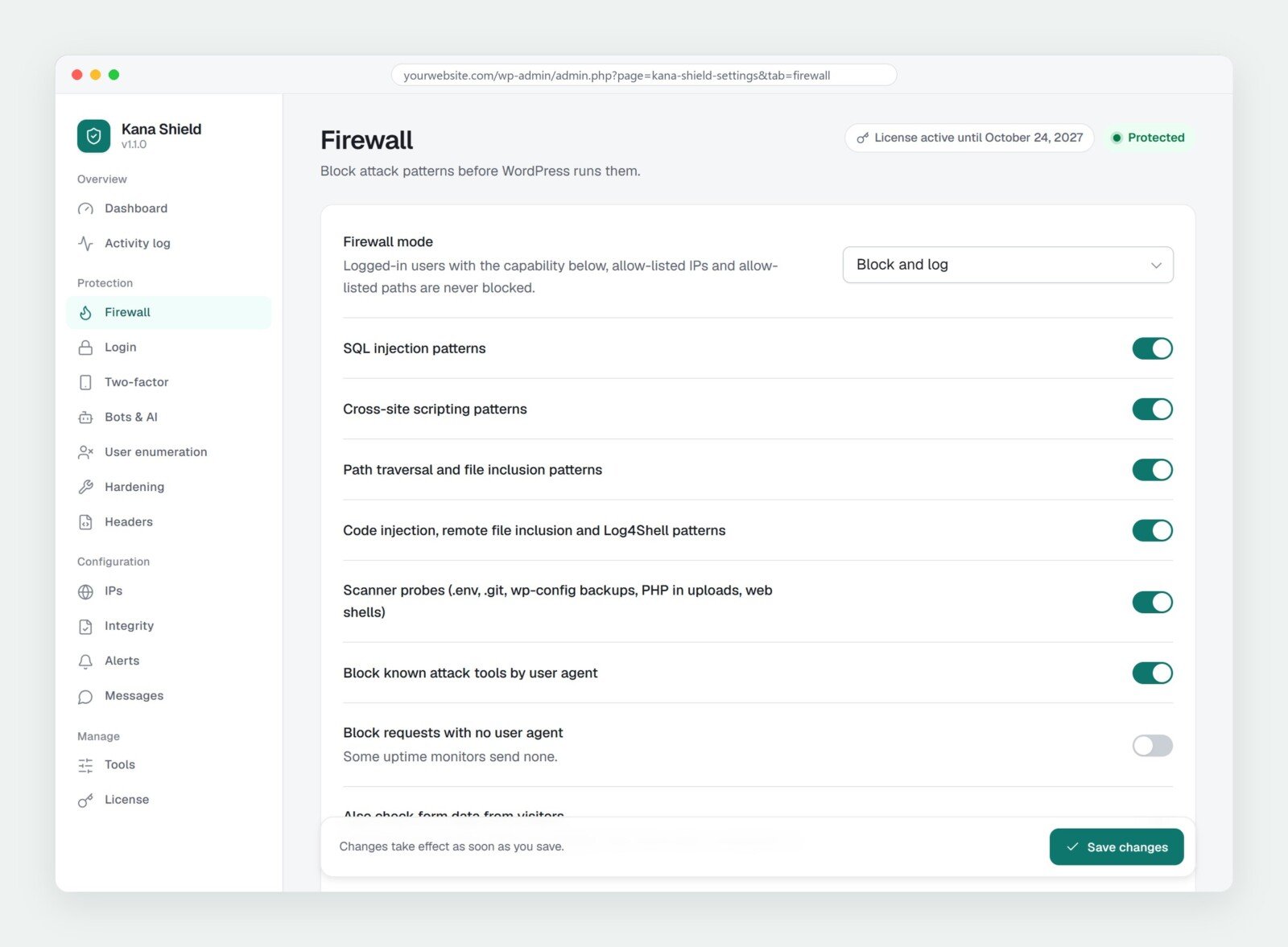
SQL injection, cross-site scripting, path traversal, code injection, Log4Shell and scanner probes are refused with one switch each. Your editors, WooCommerce, Jetpack and API connectors are never blocked.
- Learning mode for the first week on busy sites
- Allow-list for your own IPs and paths
Control scanners and AI bots
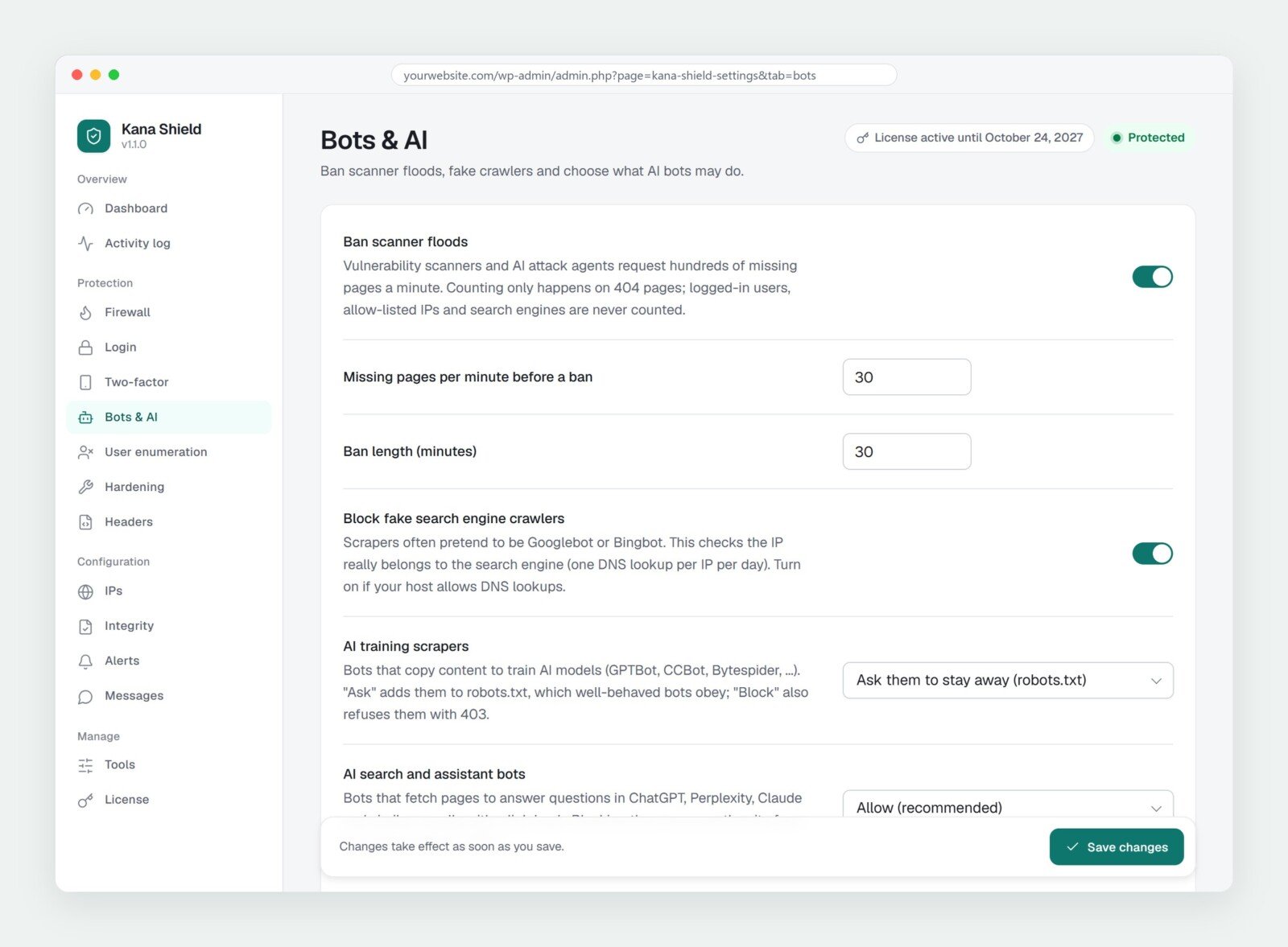
Scanner floods and AI attack agents get temporary bans, fake Googlebots can be refused, and you decide what AI training scrapers may do while AI search bots keep citing your site.
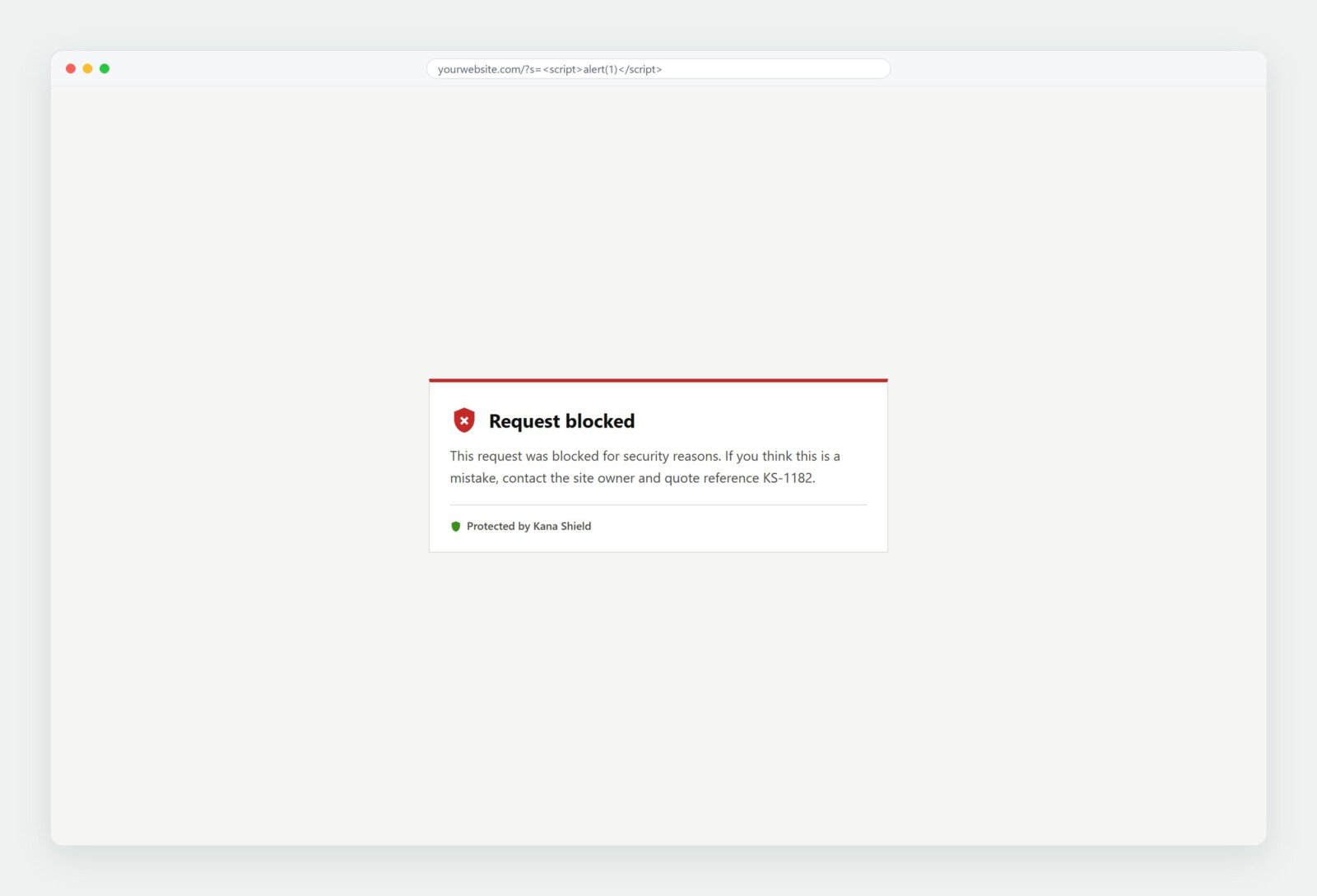
A clear answer for blocked requests
Anything the firewall refuses gets a short, branded page with a reference number. If a real visitor is ever blocked by mistake, the number leads straight to the log entry.
- Every message can be edited
- Works in light and dark mode
Everything you need before you install.
- Version
- 1.1.0
- Updated
- Platforms
- WordPress
Fresh in this release
- New app-style admin with sidebar, toggles and a report dashboard
- Kana License Hub licensing and automatic updates
- Blocked-request page with a red shield and editable branding
Before you install.
Will Kana Shield slow down my site?
No. A normal page view adds no database writes; the firewall only runs a few quick pattern checks. Heavier jobs like file checks run once a day in the background.
Do you install it for me?
Yes. Contact us and we install Kana Shield, set the correct visitor IP for your host or CDN, allow-list your office IP, turn on alerts and test that your site, forms and logins still work.
Does it work with WooCommerce, Jetpack, LiteSpeed Cache and Site Kit?
Their API paths are excluded from the firewall by default and logged-in editors are never blocked. On shops and sites with many forms we start the firewall in learning mode for the first week and switch to blocking once the log looks clean.
What happens when the license expires?
Kana Shield is a paid plugin: when the license expires, protection switches off and WordPress shows a renewal notice to administrators. Renew and protection switches straight back on. If the license server is briefly unreachable, protection stays on for 5 days.
Can I use it together with Wordfence or another security plugin?
We recommend one security plugin per job. Kana Shield detects common security plugins and warns about overlap so duplicate lockouts or headers don't confuse visitors.
Does it block AI bots?
You choose. AI training scrapers can be allowed, asked to stay away in robots.txt, or blocked. AI search and assistant bots stay allowed by default so your site can still be cited in AI answers.
What if I lock myself out?
Contact us and we unlock you, or add one line to wp-config.php that pauses the firewall, lockouts, hidden login address and two-factor login until you are back in.
What does it need to run?
WordPress 6.2 or newer and PHP 8.2 or newer. It works on Apache, LiteSpeed (including Hostinger) and Nginx hosts.
Ready when you are.
Contact us and we install, configure and test Kana Shield on your site, then hand over the license.
- 1 website
- Installation and setup
- Updates while licensed
- Email support
Pay by UPI · verified by hand
Hit a bug? We're on it.
Raise a support ticket with this product and the error — you'll get a portal account to track the fix end to end.